MP e-Uparjan 2026: किसान पंजीयन, स्लॉट बुकिंग और भुगतान स्थिति
MP e-Uparjan मध्य प्रदेश सरकार का एक ऑनलाइन पोर्टल है, जिसके माध्यम से किसान गेहूँ, धान, चना, मसूर और अन्य फसलों को MSP पर बेच सकते हैं। इस पोर्टल से किसान घर बैठे फसल पंजीकरण, मंडी स्लॉट बुकिंग और भुगतान की स्थिति आसानी से देख सकते हैं।
MP e-Uparjan क्या है?
इस योजना के तहत मध्यप्रदेश के किसान अपनी रबी (सर्दियों की) और खरीफ (मानसून की) फसलें सरकार को mpeuparjan.nic.in पोर्टल के जरिए न्यूनतम समर्थन मूल्य (MSP) पर बेच सकते हैं। इस एक पोर्टल से किसान पंजीयन, स्लॉट बुकिंग, गिरदावरी और भुगतान ट्रैकिंग – सब कुछ घर बैठे कर सकते हैं। फसल खरीदने के बाद सरकार 1–2 सप्ताह के भीतर भुगतान सीधे आपके आधार-लिंक्ड बैंक खाते में जमा करती है।
e-Uparjan की प्रक्रिया कैसे काम करती है?
फसल खरीद की पूरी प्रक्रिया 6 आसान चरणों में होती है:
- किसान e-Uparjan पोर्टल पर ऑनलाइन पंजीयन करता है।
- किसान खरीद केंद्र पर फसल पहुँचाने के लिए स्लॉट बुक करता है।
- किसान बुक की गई तारीख पर केंद्र पर फसल लेकर आता है।
- खरीदी गई फसल सरकार द्वारा ले जाई जाती है।
- फसल सरकारी गोदाम में रखी जाती है।
- भुगतान सीधे किसान के आधार-लिंक्ड बैंक खाते में भेजा जाता है।
MP e-Uparjan पर कियोस्क पंजीयन प्रक्रिया
अगर आप कियोस्क या CSC सेंटर चलाते हैं और MP e-Uparjan पोर्टल पर पंजीयन करना चाहते हैं, तो इन चरणों का पालन करें:
- आधिकारिक पोर्टल पर जाएं: https://mpeuparjan.nic.in/
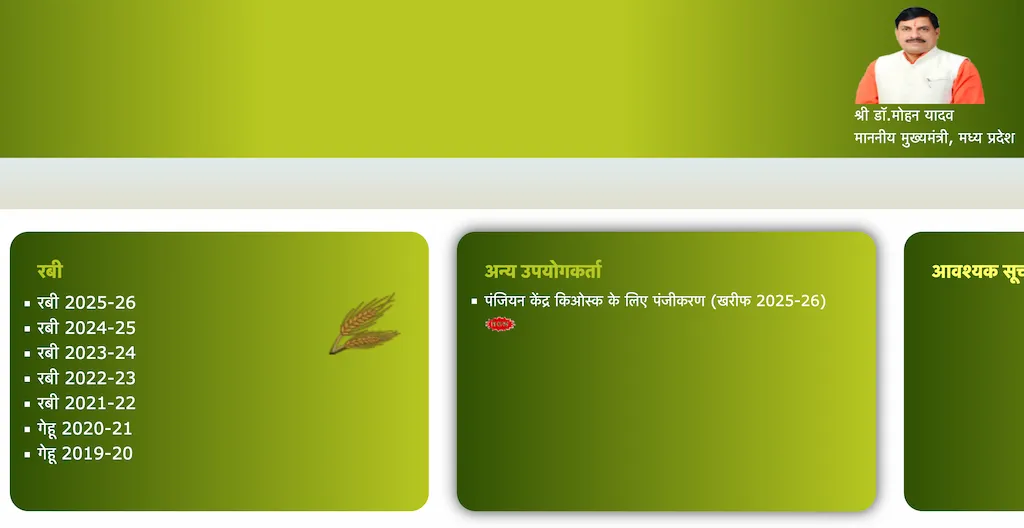
- होमपेज पर Other Users सेक्शन में जाएं और Registration Center Kiosk Registration (Kharif 2025-26) चुनें।
- एक नया पेज खुलेगा। Kiosk/CSC Registration Determination चुनें।
- अपना जिला, तहसील और ग्राम भरें।
- Manager सेक्शन में सावधानी से संस्था प्रकार, संस्था कोड, ऑपरेटर नाम, आधार नंबर, मोबाइल नंबर, ईमेल ID और पता दर्ज करें।
- विवरण जाँचें, Send OTP पर क्लिक करें, अपने मोबाइल पर आया OTP दर्ज करें और सत्यापित करें।
- ऑपरेटर का नाम, ईमेल ID, मोबाइल नंबर, आधार नंबर और पता दर्ज करें, फिर OTP से सत्यापित करें।
- अंत में अपनी संस्था का प्रमाण पत्र (लोक सेवा केंद्र, MP Online Kiosk, CSC, Cyber Café आदि) अपलोड करें और Submit पर क्लिक करें।
- अधिकारी द्वारा आपके केंद्र का सत्यापन होने के बाद, Login ID और Password आपके पंजीकृत मोबाइल नंबर पर भेजा जाएगा।


फसल पंजीयन के लिए आवश्यक दस्तावेज
पंजीयन से पहले ये दस्तावेज तैयार रखें:
- समग्र ID
- खसरा / B-1 / भू-पुस्तिका (भूमि रिकॉर्ड बुक)
- बैंक पासबुक (DBT-लिंक्ड खाता)
- आधार कार्ड
- आधार-लिंक्ड मोबाइल नंबर
e-Uparjan पर किसान पंजीयन कैसे करें?
किसानों को CSC सेंटर या जन सेवा केंद्र के माध्यम से पंजीयन करना होता है। कियोस्क ऑपरेटर यह काम इस तरह करता है:
- आधिकारिक वेबसाइट पर Other Users सेक्शन में जाएं।
- Kiosk/CSC Registration Center Login चुनें, User ID और Password डालकर लॉगिन करें।
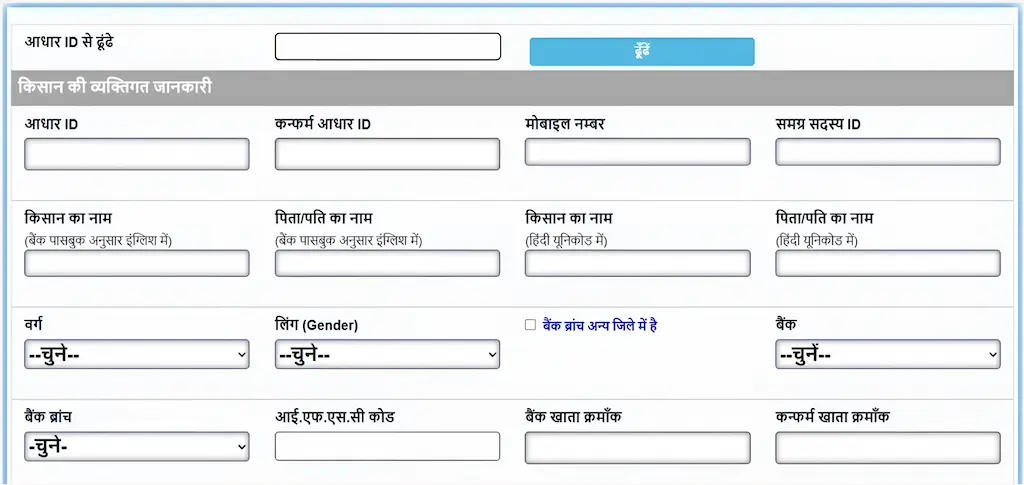
- Main Page > Master Section > NEW/OLD Farmer Registration चुनें।
- किसान का मूल विवरण भरें – नाम, मोबाइल नंबर, आधार नंबर, समग्र ID और बैंक विवरण।
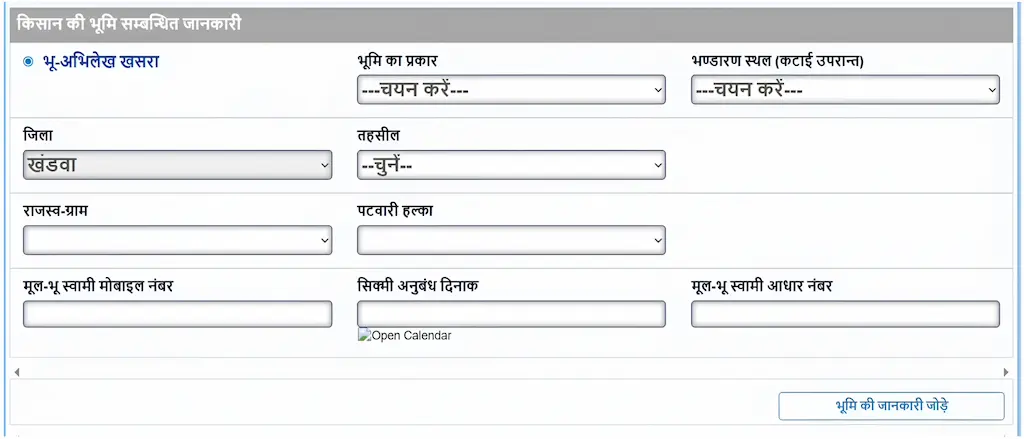
- भूमि विवरण दर्ज करें – भूमि प्रकार, भंडारण स्थान, जिला, राजस्व ग्राम और पटवारी हल्का नंबर।
- ऑपरेटर और किसान सत्यापन चेकबॉक्स टिक करें, फिर Save पर क्लिक करें। पंजीयन पूरा हो जाएगा।
उपार्जन पर्ची कैसे डाउनलोड करें?
- आधिकारिक MP e-Uparjan वेबसाइट पर जाएं।
- चालू फसल वर्ष (रबी 2026-27) चुनें।
- 'किसान पंजीयन खोज (गेहूँ)' पर क्लिक करें।
- अगले पेज पर अपना जिला, किसान कोड/मोबाइल नंबर/समग्र ID और कैप्चा कोड भरें, फिर 'खोजें' पर क्लिक करें।
- 'उपार्जन पर्ची प्रिंट करें' पर क्लिक करके पंजीयन रसीद डाउनलोड करें।
फसल बेचने के लिए स्लॉट बुकिंग कैसे करें?
किसान और कियोस्क ऑपरेटर दोनों इन चरणों से स्लॉट बुक कर सकते हैं:
- आधिकारिक पोर्टल पर जाएं: https://mpeuparjan.nic.in/
- होम मेनू से Farmer Slot Booking पर क्लिक करें।
- अपना जिला, किसान कोड, कैप्चा कोड और मोबाइल पर आया OTP दर्ज करें।
- अपनी तहसील, नजदीकी खरीद केंद्र और जिस तारीख को फसल बेचनी है वह चुनें।
- स्क्रीन पर बुकिंग रसीद आएगी। इसे प्रिंट करें और तय तारीख पर खरीद केंद्र पर साथ लेकर जाएं।


फसल भुगतान की स्थिति कैसे जाँचें?
यह जानने के लिए कि आपकी फसल का भुगतान हुआ या नहीं, ये चरण अपनाएं:
- नीचे दिए गए लिंक पर क्लिक करें या अपने ब्राउजर में https://jit.nic.in/ खोलें।
- फसल वर्ष और फसल सीजन चुनें, फिर अपना किसान ID और कैप्चा कोड भरें। Check Payment Status पर क्लिक करें।
- आपको पूरी भुगतान जानकारी मिलेगी – कुल राशि, ऋण कटौती और भुगतान की गई राशि।

MP Kisan मोबाइल ऐप से पंजीयन कैसे करें?
- Play Store से MP Kisan App डाउनलोड और इंस्टॉल करें।
- ऐप खोलें और अपने मोबाइल नंबर और ईमेल ID से लॉगिन करें।
- अपना नाम, जिला, तहसील, हल्का और ग्राम चुनें, फिर Register बटन दबाएं।
- खाता धारक और हल्का चुनें, फिर Submit पर क्लिक करें।
- विवरण जाँचें और Click Here to Register बटन दबाएं।
- अपने आधार के अंतिम 4 अंक डालें, Submit करें और पावती पर्ची डाउनलोड करें – इसे सुरक्षित रखें।

e-Uparjan पोर्टल पर गिरदावरी कैसे जाँचें?
गिरदावरी खेती की आधिकारिक सरकारी जाँच है। इसमें पटवारी खेत पर आकर बोई गई फसल और उसकी स्थिति दर्ज करता है। यह डेटा खसरा-खतौनी रिकॉर्ड में रखा जाता है और फसल बीमा तथा मुआवजे के लिए उपयोग होता है। इसे इस तरह जाँचें:
- आधिकारिक पोर्टल पर जाएं: https://mpeuparjan.mp.gov.in/
- होमपेज से फसल सीजन और वर्ष चुनें — उदाहरण के लिए, खरीफ 2025-26 या रबी 2025-26।
- नए पेज पर Check Girdawari बटन पर क्लिक करें।
- अपना जिला, तहसील, ग्राम, पटवारी हल्का नंबर और खसरा नंबर दर्ज करें, फिर Girdawari Search पर क्लिक करें।
- आपको फसल का नाम, सिंचाई प्रकार, बुवाई क्षेत्र, भूमि प्रकार और सर्वेक्षण स्थिति जैसी जानकारी मिलेगी।


e-Uparjan के संबंध में किसानों के लिए जरूरी सुझाव
- समय पर पंजीयन करें।
- भूमि और फसल से जुड़ी जानकारी सही-सही भरें।
- SMS सूचनाओं और तारीखों पर ध्यान दें।
- फसल की गुणवत्ता अच्छी रखें।
- अपना बैंक खाता आधार से लिंक करवाएं।
पंजीयन के समय होने वाली सामान्य गलतियाँ और उनके समाधान
कई किसान पंजीयन के दौरान कुछ आम गलतियाँ करते हैं जिससे उनका आवेदन अटक जाता है। नीचे ऐसी गलतियाँ और उनके समाधान दिए गए हैं:
- गलत आधार नंबर: आधार नंबर हमेशा ध्यान से भरें। एक भी अंक गलत होने पर OTP नहीं आएगा।
- बैंक खाता आधार से लिंक नहीं: भुगतान DBT के जरिए होता है, इसलिए बैंक खाते का आधार से लिंक होना जरूरी है।
- समग्र ID गलत भरना: समग्र ID 8 अंकों की होती है। इसे अपनी समग्र पोर्टल पर्ची से देखकर भरें।
- खसरा नंबर में गलती: भूमि रिकॉर्ड बुक (भू-पुस्तिका) से खसरा नंबर देखकर ही भरें।
- OTP समय पर न भरना: OTP केवल कुछ मिनटों के लिए वैध होता है। मिलने के तुरंत बाद दर्ज करें।
2026-27 में फसलों का न्यूनतम समर्थन मूल्य (MSP)
नीचे दी गई तालिका में रबी 2026-27 और खरीफ 2025-26 सीजन के लिए सरकार द्वारा घोषित MSP दर दी गई है। किसान इन्हीं दरों पर अपनी फसल e-Uparjan पोर्टल के जरिए बेच सकते हैं।
| फसल | सीजन | MSP (₹ प्रति क्विंटल) |
|---|---|---|
| गेहूँ | रबी 2026-27 | ₹2,585 |
| चना | रबी 2026-27 | ₹5,875 |
| मसूर | रबी 2026-27 | ₹7,000 |
| सरसों | रबी 2026-27 | ₹6,200 |
| धान | खरीफ 2025-26 | ₹2,300 |
| ज्वार (हाइब्रिड) | खरीफ 2025-26 | ₹3,371 |
| बाजरा | खरीफ 2025-26 | ₹2,625 |
* MSP दरें CCEA द्वारा अक्टूबर 2025 में अधिसूचित की गई हैं। सटीक जानकारी के लिए desagri.gov.in देखें।
Frequently Asked Questions
MP e-Uparjan मध्यप्रदेश सरकार की एक डिजिटल योजना है। इसके तहत पंजीकृत किसान अपनी फसल ऑनलाइन न्यूनतम समर्थन मूल्य (MSP) पर बेच सकते हैं और पंजीयन, स्लॉट बुकिंग व गिरदावरी जैसी सुविधाओं का लाभ उठा सकते हैं।
गिरदावरी खेत की आधिकारिक सरकारी जाँच है जिसमें पटवारी बोई गई फसल और उसकी स्थिति दर्ज करता है। यह डेटा खसरा-खतौनी में रखा जाता है और फसल बीमा तथा मुआवजे के काम आता है।
किसान mpeuparjan.nic.in पर जाकर, MP Kisan मोबाइल ऐप से, या नजदीकी कियोस्क/जन सेवा केंद्र के माध्यम से पंजीयन कर सकते हैं।
इस योजना के तहत फसल खरीदने के 1 से 2 सप्ताह के भीतर भुगतान सीधे किसान के आधार-लिंक्ड बैंक खाते (DBT) में जमा किया जाता है।
किसान इस पोर्टल पर गेहूँ, धान, ज्वार, बाजरा, चना, मसूर और सरसों बेच सकते हैं।
मध्यप्रदेश के सभी पंजीकृत किसान जो अपनी फसल MSP पर बेचना चाहते हैं, इस योजना का लाभ उठा सकते हैं।
किसान किसी भी समस्या के लिए हेल्पलाइन नंबर 07552525803 पर कॉल करें या euparjanmp@gmail.com पर ईमेल करें।
स्लॉट बुकिंग से किसान को फसल लाने की निश्चित तारीख और समय मिलता है। इससे खरीद केंद्र पर भीड़ नहीं होती और प्रक्रिया सुचारू रूप से चलती है।
हाँ। किसान MP Kisan ऐप के जरिए मोबाइल से पंजीयन कर सकते हैं। इसके अलावा mpeuparjan.nic.in वेबसाइट भी मोबाइल ब्राउजर पर खुलती है।
Helpline Number: 07552525803 (Monday to Sunday, 10 AM – 6 PM)
Official Email: euparjanmp@gmail.com
Official Website: mpeuparjan.mp.gov.in